Requirements
Node 18 or newer, and git on your PATH. That's the whole list —
diffotator has no runtime dependencies. The walkthrough map's React, React Flow and ELK ship
prebuilt in web/vendor/.
macOS, Linux and Windows. The browser is whatever open /
xdg-open / start launches.
Install
The same on macOS, Linux and Windows:
npm install -g diffotator
diffotator setup            # teach your agent the /diffotator command

# optional: open a review automatically after every turn
diffotator hook --install
diffotator setup installs the command for Claude Code (in
~/.claude/commands/) and prints the path of the instructions file, so you can
add it to any other agent's rules. Nothing is installed into the repository you review.
Upgrade: npm update -g diffotator, then diffotator setup again
so your agent gets the new instructions. Just trying it? npx diffotator runs it
without installing.
From source
git clone https://github.com/adisagar2003/diffotator.git
cd diffotator
npm link        # puts the diffotator command on your PATH
node test.js    # ok — all checks passed
Using it with your agent
Once the command is installed, ask in plain words:
use diffotator to review https://github.com/you/shop/pull/42
use diffotator to review my changes
For a pull or merge request link, the agent checks it out in a temporary folder, reads the
change and your repo's own docs, writes the walkthrough, and opens it. On someone else's
change it never edits their branch: question: comments get answers, and the rest
come back as draft review comments that are posted only when you say so.
How the command works
The integration is one slash command. claude/diffotator.md installs as
/diffotator and tells Claude to run the CLI in the background, wait, and act on
whatever comes back:
---
description: Review a change in diffotator — your working tree, a branch, or someone's MR/PR — as a walkthrough
allowed-tools: Bash(diffotator:*)
---

Open a review in diffotator. It opens on a walkthrough: what the change does,
the domain background a reviewer needs, and a map of the change…
Then in any session:
/diffotator
/diffotator --base origin/main
The CLI prints its URL on stderr and the review result on stdout, so the feedback arrives clean. It blocks until you submit, then exits.
Automatic review (Stop hook)
A review tool you have to remember to run reviews nothing. Install the hook and every turn that leaves real changes gets looked at, without you typing anything:
$ diffotator hook --install
Installed the diffotator Stop hook in ~/.claude/settings.json
Reviews open when a turn leaves 3+ changed files.
It appends to hooks.Stop in ~/.claude/settings.json, leaving any
hooks you already have in place, and writes a
settings.json.diffotator-backup first.
diffotator hook --uninstall removes just its own entry.
What the agent gets
| You press | Hook returns | Effect |
|---|---|---|
| Send feedback | {"decision":"block","reason":…} | Turn is blocked; your review becomes the reason and the agent keeps working |
| Approve | {} | Turn ends normally |
| Close | {} | Turn ends; nothing sent |
When it stays quiet
This is the part that decides whether the hook is useful or maddening. A review only opens if it survives all four gates:
- Clean tree — nothing uncommitted, nothing to review.
- Below threshold — fewer than
DIFFOTATOR_HOOK_MIN_FILESchanged files (default 3). A one-line turn is noise. - Unchanged since your last review — the working tree is fingerprinted by content, so approving a review and letting the agent add one more sentence will not pop the browser back open. Editing a file in place does count as new work, even though the file count is identical.
- Loop guard — if the harness reports that a Stop hook already forced a continuation, this one allows immediately.
DIFFOTATOR_HOOK_MIN_FILES=1 to review everything,
DIFFOTATOR_HOOK=off to disable without uninstalling, and
DIFFOTATOR_DEBUG=1 to print the gate decision to stderr.
The walkthrough
Every review opens on a walkthrough. On top: What this change does (a short summary, the key changes, decisions, and the one place to look hardest) beside Know this first (the words you need, each linked to the doc it came from). Below: the map.
The map groups the change into parts. Each box shows what's inside it — parts hold smaller parts or files, files hold their tests. Labelled arrows say how parts connect; dashed arrows follow a call from one file to another. Hover a box and its arrows light up.
Click a part and the map becomes that part. Click a file and its diff opens in the same spot. ← Back, the breadcrumb or your browser's Back go up again. Classic (or ⇧C) shows the full git client.
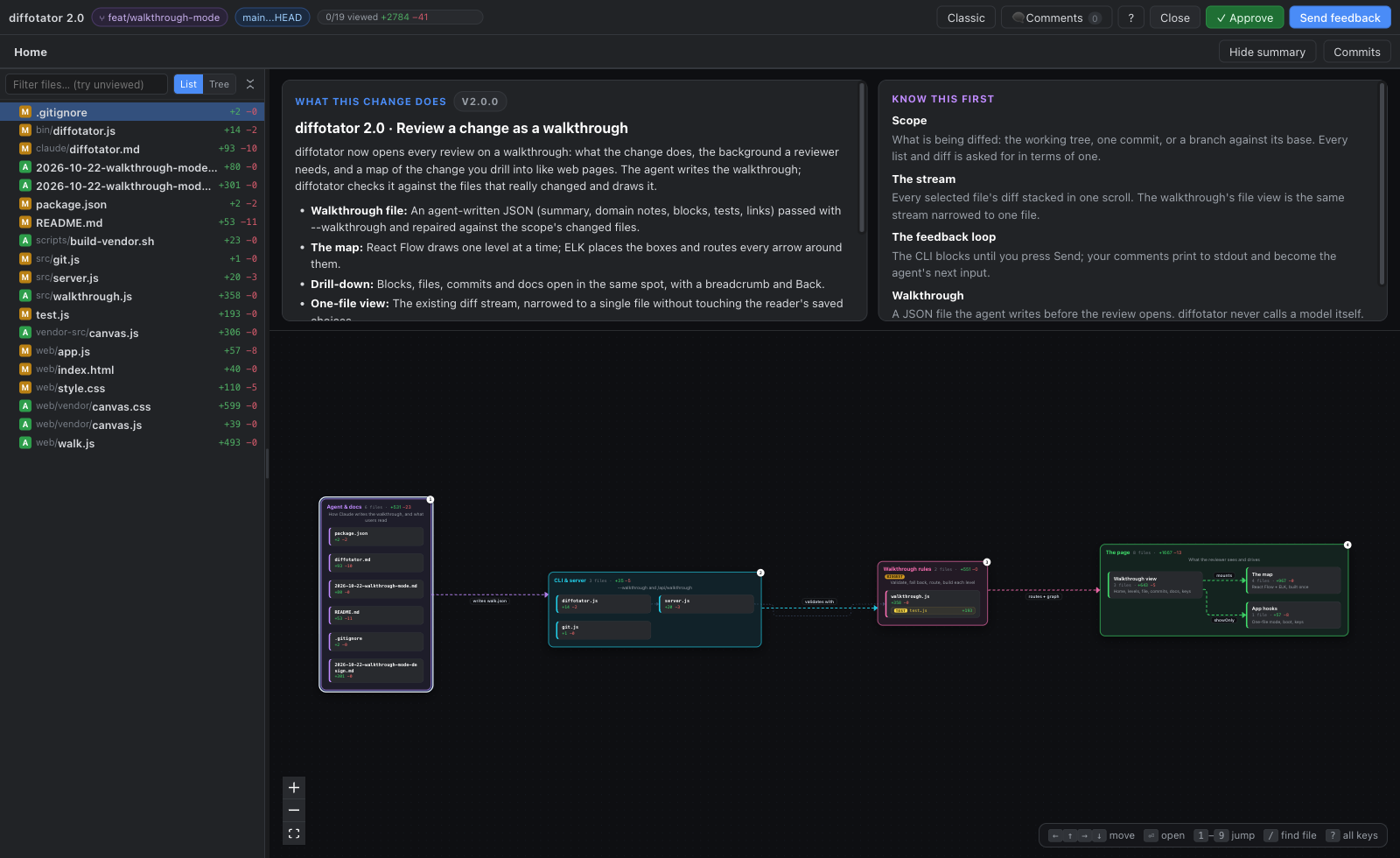
diffotator reviewing its own 2.0 change.
No walkthrough written?
The map groups the change by folder instead, so the walkthrough is always where you start.
Scopes
A scope is what you're reviewing. The sidebar offers three, and everything downstream — the file list, the diffs, the file tree — is expressed in terms of the one you pick.
| Scope | Shows |
|---|---|
| Local Changes | Working tree vs HEAD, including untracked files. The default, and
what you want straight after an agent run. |
| vs <base> | The whole branch against its base, auto-detected from your upstream then
origin/main, origin/master, origin/develop.
Override with --base. |
| All Commits | The commit graph. Selecting a commit reviews that commit alone, against its first parent. |
Below those, the sidebar lists worktrees, branches, tags, stashes and remotes. Selecting one loads its history into the commit list.
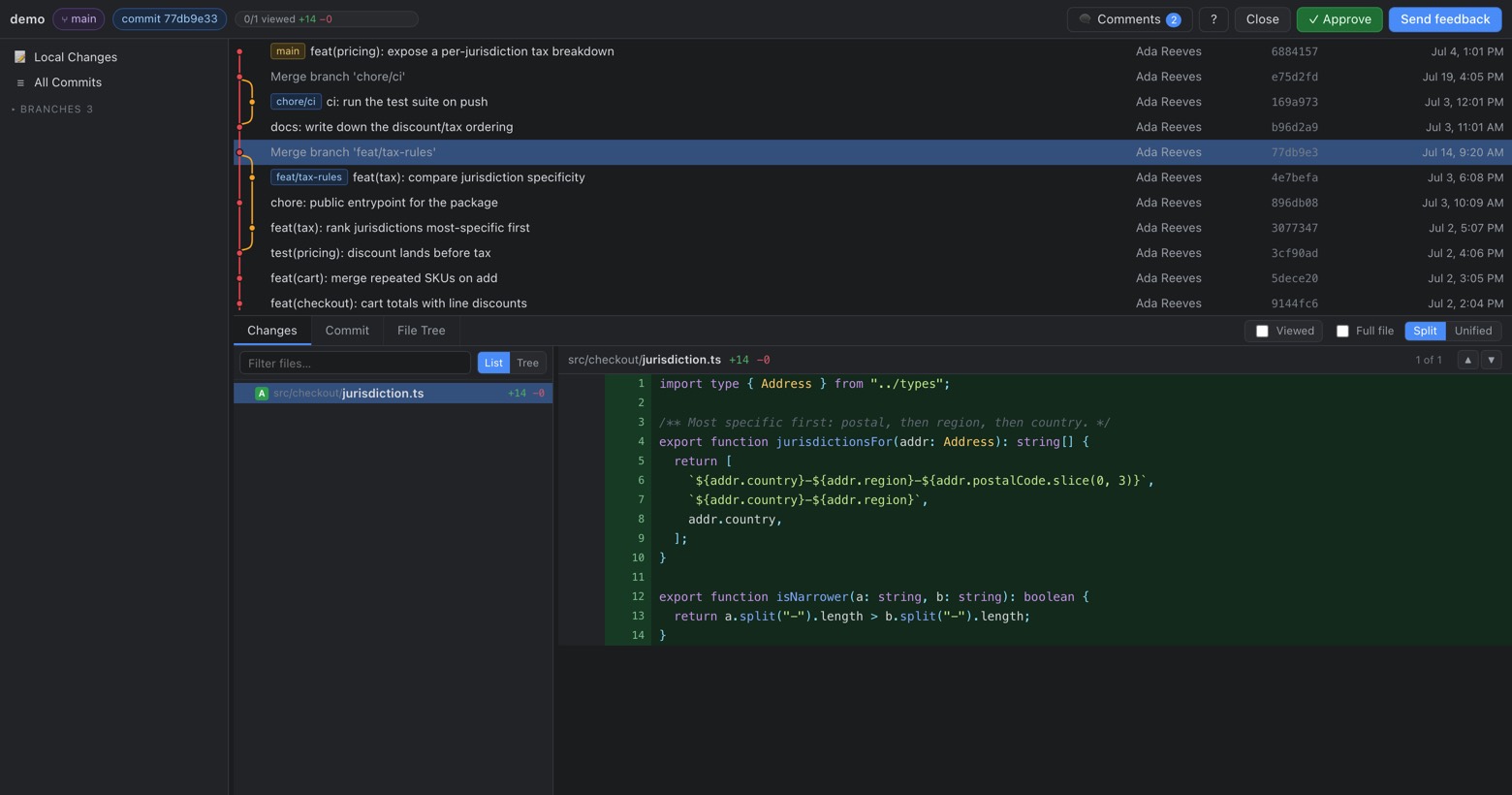
A merge selected in All Commits — shown against its first parent, so you see what the merge brought in.
origin/<your-branch> is
the same line of work, so diffing against it only shows what you haven't pushed — not a
review.
The review loop
Built for the case where an agent just touched fifty files:
- Read the file. n and p jump between changes inside it.
- Something wrong? c on the focused line, or click any line number. For something wrong with the file — it should not exist, it belongs elsewhere — use the 🗨 pill on the file’s header row.
- v marks the file viewed and jumps to the next unviewed one.
- Repeat until the progress bar reads
56/56. - Send feedback, or Approve if there's nothing to say.
Viewed files dim with a ✓ and the header tracks
12/56 viewed +2,341 −187. Viewed state is kept per scope — having read a
file in the working tree isn't the same as having read it in a commit.
Progress and unsent comments persist to ~/.local/share/diffotator and survive
across separate runs, not just reloads.
localStorage? It is scoped to the origin including the
port, and every run binds a fresh random port — so drafts written by one session were
invisible to the next. Disk also works when the browser is on a different machine.
Browsing beyond the diff
Three tabs sit under the commit list:
- Changes — the changed files for the current scope, plus the diff.
- Commit — author, date, refs, sha, parents and the full message.
- File Tree — every file in the repository at that revision, including untracked ones. Open any file and comment on it, even if the change never touched it.
The file pane is a flat List by default, because reviewing is working through a list. Switch to Tree for the repo browser; single-child directory chains fold into one row either way.
Full file keeps the diff marks and stops folding, so you can read a change in the context of everything around it.
Keyboard
On the map
| Key | Action |
|---|---|
| ← ↑ → ↓ | Move between boxes |
| ⏎ or Space | Open the box |
| 1 – 9 | Open box number N |
| ⌫ or Esc | Back |
| g | Home |
| 0 + − | Fit, zoom in, zoom out |
| m | Show or hide the summary |
| j k | In a file: next / previous file in walkthrough order |
| ⇧T | Jump between a file and its tests |
| / or ⌘K | Go to any file |
| h | Commits |
| ⇧C | Classic view and back |
In a diff
| Key | Action |
|---|---|
| ⌃h ⌃j ⌃k ⌃l | Move between panes (⌃ + arrows too) |
| j k | Next / previous file |
| n p | Next / previous change in the file |
| ] [ | Next / previous comment you left, wrapping |
| ↑ ↓ | Move the line cursor |
| c | Comment on the focused line |
| v | Mark viewed, jump to next unviewed |
| s | Split / unified |
| f | Full file / diff only |
| w | Ignore whitespace-only changes |
| t | Comments panel |
| / | Filter the file list — a path substring, or unviewed / commented / added / deleted / modified / renamed / untracked / binary / hidden; ! negates, terms are ANDed |
| ⌘F | Find in the current file |
| ⌘↵ | Save comment, or send the review |
| Esc | Close the popover, search or dialog |
| ? | Shortcut sheet |
CLI
diffotator [review] [options]      # open a review now
diffotator hook                    # Stop-hook mode (hook JSON on stdin)
diffotator hook --install          # add the Stop hook
diffotator hook --uninstall # remove it| Flag | Meaning |
|---|---|
| -C, --cwd <dir> | Repository to review. Default: current directory. |
| -b, --base <ref> | Base ref for the branch scope. Default: auto-detected. |
| -p, --port <n> | Port to listen on. Default: a random free port. |
| --no-open | Don't launch a browser; just print the URL. |
| --title <s> | Header title for the session. |
| --walkthrough <path> | Open on a walkthrough your agent wrote (JSON). Opens on the branch-vs-base range. |
| -h, --help | Usage. |
Reviewing a pull or merge request
Easiest: ask your agent, use diffotator to review <link>. By hand, check it out
locally and point diffotator at the base — this also gets you the full working tree to browse:
gh pr checkout 123   # or: glab mr checkout 123
diffotator --base origin/main
The server binds to 127.0.0.1 only.
Output contract
diffotator blocks until you submit. The URL goes to stderr; the result goes to stdout.
| You press | stdout |
|---|---|
| Send feedback | A # Code review feedback markdown document |
| Approve | The user approved. |
| Close / Ctrl-C | Review session closed without feedback. |
Exit code is 0 in every case — the outcome is in the text, not the status.
The document groups comments by file, orders them by line, and puts a blocking count above
the first one.
Shape of the document
# Code review feedback

Reviewed `repo` — origin/main...HEAD. 2 comments.

## Overall

<your summary, if you wrote one>

> **1 blocking comment** — these must be resolved.

## `path/to/file.ts`

### path/to/file.ts:23 — issue (blocking)

*L23*

```ts
<the line you commented on>
```

<your comment>

Suggested replacement:

```ts
<your suggested code, if any>
```

---

Address every comment above…
How it stays fast
The usual reason a browser diff viewer feels slow is that it ships the entire review to the page as one document. diffotator sends nothing up front.
- Per-file, on demand. Git data is fetched when you open a file, and the next file is warmed in the background so j feels instant.
- Windowed rows. The commit list and the diff render only the visible slice. A 61,000-line minified diff opens with no stall.
- Derived heights. Code rows are uniform; inline comment cards get a height computed from an estimated wrap rather than measured, so the prefix-sum index that drives windowing stays exact and scrolling never jumps.
- Highlighting on visible rows only, from a small regex tokenizer — there's no grammar bundle to download.
- Full context in one call.
git diff -U1000000per file, so expanding folded regions needs no round trip.
Limits
Deliberately not built — use your git client:
Staging, committing, push and pull, rebase, blame, merge conflict resolution, image diffs, and fetching pull requests from GitHub or GitLab.
Known edges
- Merge commits are shown against their first parent — what the merge brought in.
- Diffs over 200,000 changed lines and files over 4 MB are reported rather than rendered.
- Binary files are detected and skipped; there's no image diff.
- One session at a time per invocation. Submitting ends the process — that's the contract that lets the agent read the result.
Troubleshooting
"is not a git repository"
diffotator resolves the repo root from the working directory. Use -C to point it
elsewhere.
The "vs base" scope is missing
No suitable base was found. Every candidate was either your own remote branch or had no
commits between it and HEAD. Pass one explicitly with
--base origin/main.
The browser didn't open
The URL is printed on stderr — open it by hand. --no-open makes that the
default behaviour.
The command seems to hang
That's the contract: it blocks until you submit in the browser, which is how the agent gets your feedback. Run it in the background, or Ctrl-C to close the session without sending anything.
My comments disappeared
Drafts live in ~/.local/share/diffotator/drafts, keyed by repository, and are
cleared once a review is submitted. Override the location with
DIFFOTATOR_DATA_DIR.
The hook keeps opening a browser
Raise DIFFOTATOR_HOOK_MIN_FILES, or set DIFFOTATOR_HOOK=off. Run
with DIFFOTATOR_DEBUG=1 to see why the gate fired.
The hook never opens
DIFFOTATOR_DEBUG=1 diffotator hook <<< \'{"cwd":"$PWD"}\' prints the
gate decision — usually clean-tree, below-threshold or
unchanged-since-review.
Comments
Click any line number in either gutter, or press c. Labels follow Conventional Comments:
suggestionnitquestionissuepraisethoughtnotetodochore(old side)so the agent knows which version you mean.Label, body, blocking flag, suggested replacement — and the comment already saved on this file rendered inline behind it.
Saved comments render inline under the line they discuss, with edit and delete. The Comments panel lists them all and jumps to any one — including comments on files outside the current change set.